Labels

Showing posts with label SSRS. Show all posts

Sunday, 9 February 2014

Stack Chart in SSRS

Stack Chart in SSRS 2008


For stack chart we will try to show Expense, online profit and offline profit according to locales in SSRS

Stack Chart in SSRS 2008, SSRS basics
  • Drag n Drop charts from the toolbox to the report
  • select stack chart from the options
  • In values section, select expenses, online revenue and offline revenue and select locale in category
Now my main focus should be on expenses but since the number is too low it is not quite visible in stack chart, hence here I will have to use calculate vertical axis as logarithmic, to do show execute following steps


  • Right click on vertical axis and select vertical axis property
  • Select "Use logarithmic Scale" and click on OK. You will observe that know the vertical axis is calculated logarithmic-ally
  • Click on preview window and preview the chart


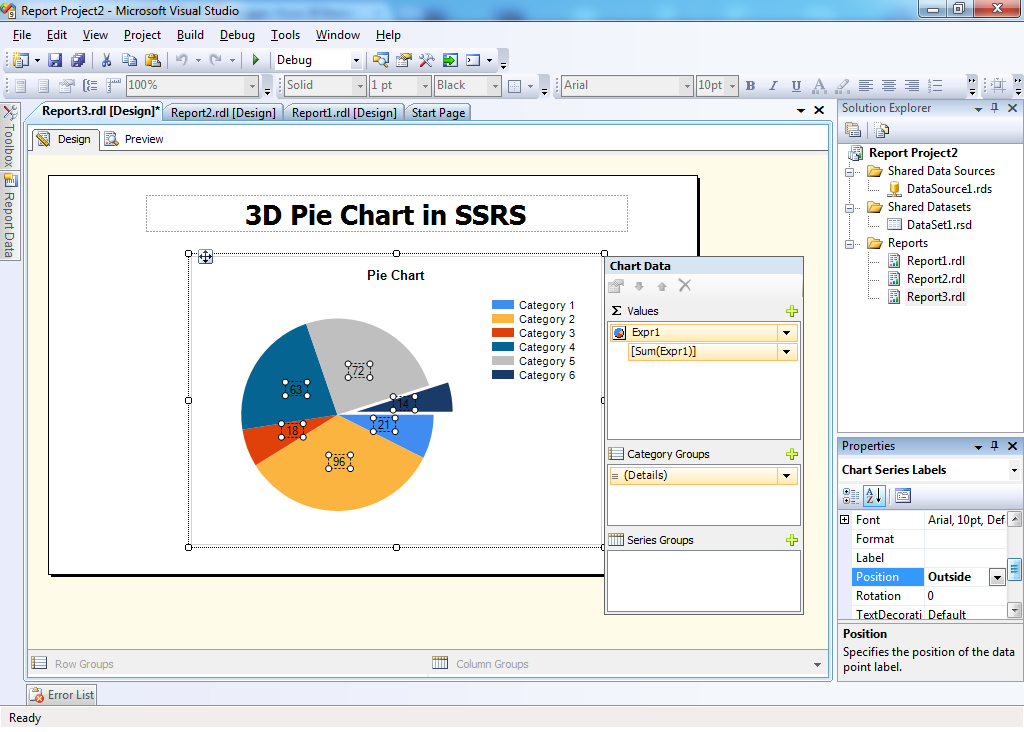
3D Pie chart in SSRS

                              3D Pie chart in SSRS


Here we will show Page Views according to Locales in Pie Chart

The locale column contains the locale names and page views column contains the respective number of page views 

  • Add a report and map the data set with report
  • From the toolbox drag n drop chart to the reports 

  • Select Exploded Pie chart

  • Enter Page Views in Values Section and locale in series section

  • Right Click and select show data labels
  • Select data labels and from the properties window set position property to Outside, so that the labels are displayed outside the pie chart


  • Right click and select chart properties
  • In the chart properties, select 3D display option and check the Enable 3D option

  • Click on preview window and view the chart


Sunday, 26 January 2014

Connect SSRS with Excel Step by Step

                                                Connect Excel as source to SSRS

Click on create 'Add new data scource'


Choose ODBC as Connection Type and click OK


Choose Excel System Data source name

Select 'Use  Connection String'

Select Excel as 'Machine Data Source' and click on New


Select User Data Source and Click on Next


Select 'Microsoft Excel Driver'  and click on Next


Click On Finish


Give Data Source as Name


Select the Excel file and Click on OK