Showing posts with label T-SQL. Show all posts

Saturday, 12 April 2014

Query to display total number of rows for each tables in a database - SQL


Following query displays the total number of rows for each table in a database.


  • Open SSMS
  • Select database
  • Execute the below Query:

             select sysobjects.name 'Table Name',rowcnt 'Total # Rows' from sysindexes 
             inner join  sysobjects on sysindexes.id= sysobjects.id
             where indid < 2
             and sysobjects.xtype='U'
            Order by 'Total # Rows' desc

The above query will return the list of all the tables in a database along with total numbers of rows in it.

Saturday, 5 April 2014

Delete duplicate rows using Row_number and CTE in SQL

                   We can use Row_Number to delete duplicate rows from a table, as we know Row_Number function allocates serial number based on a key column.

Consider a table named 'EmpDetails' which has data as below:


As seen in the above screen shot there are duplicate records for EmpId 1,2 and 3

By using CTE and Row_number function we can remove the duplicate records from the above table. The query to remove duplicate values is as follow:

Query:

With CTE as
(select *,ROW_NUMBER() over(partition by empid order by empid) as Row_num from dbo.EmpDetails)

delete from CTE where Row_num > 1

This query will delete the duplicate rows from the EmpDetails table

Now, if we see the data in the EmpDetails Table it will contain only unique values in EmpID column.

Select * from dbo.EmpDetails


Sunday, 30 March 2014

Query to display names of all columns and data types in a table - SQL

Following is the query that returns column name and data type in a table in SQL:


Replace the string 'Table Name' with the actual table name

select first.name[Column Name],

case when second.name IN ('char', 'varchar', 'nchar', 'nvarchar') then second.name + 
' (' + convert(nvarchar(10),first.max_length ) + ')' 
when second.name IN ('decimal','numeric') then second.name + ' (' + convert( nvarchar(10),first.precision ) + 
', ' + convert( nvarchar(10),first.scale ) + ')'
else second.name end [Data Type],
case first.is_nullable when 1 then 'Yes' else 'No' end [Allow Nulls]
from sys.columns first
inner join sys.types second on first.system_type_id=second.system_type_id
where object_name(first.object_id)='Table Name'
order by first.column_id


Ranking Functions in SQL Server with example

There are four types of Ranking Functions in SQL. All the Ranking Functions are used with Over Clause
  • Row_Number: The row_number function gives each a row in a table a serial number. 
Example: 

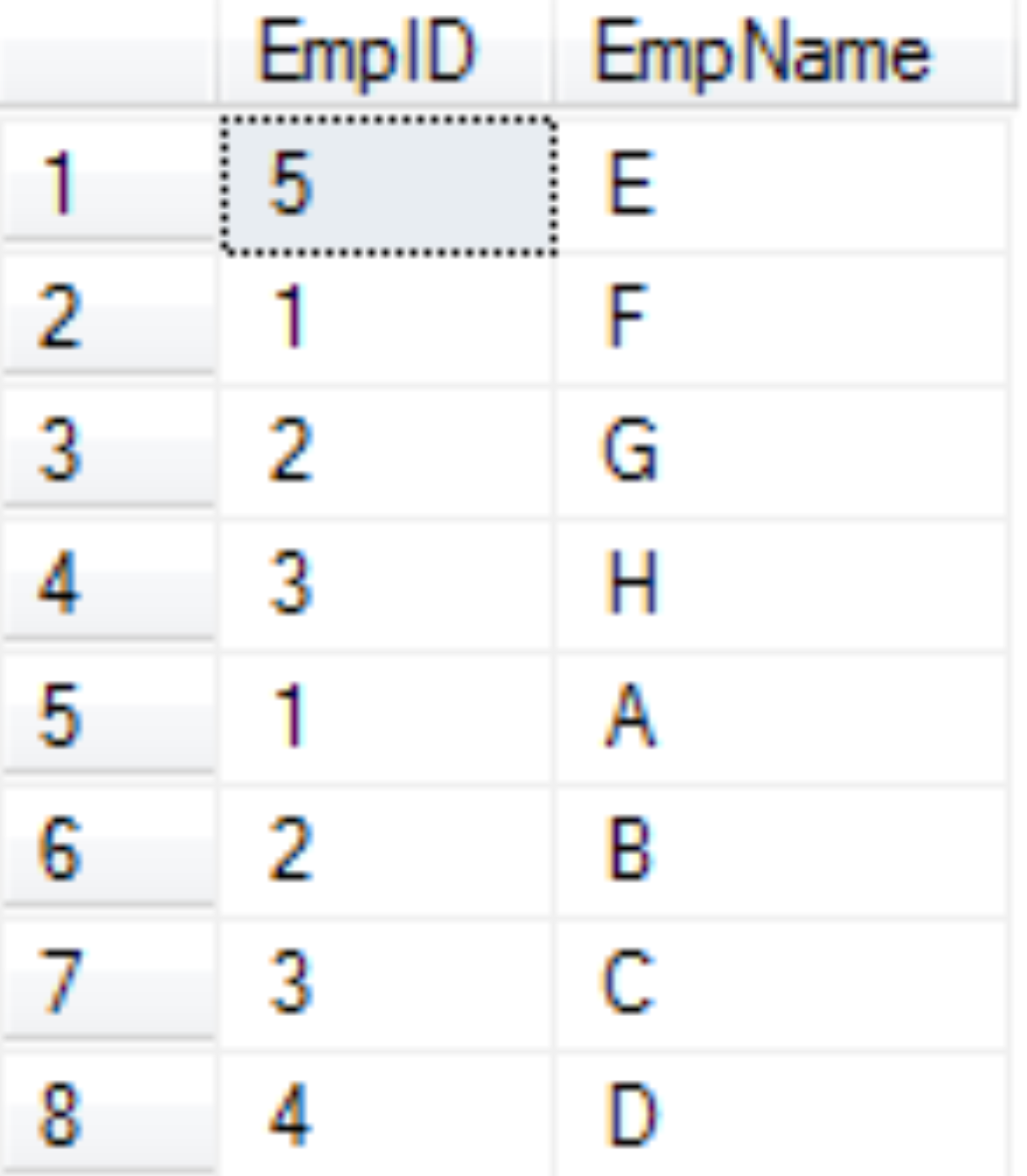
Consider below Table named 'EmpDetails', the table contains two columns 'EmpID' and 'EmpName'
  

Now we will implement Row_number to the above table:

Query:

select *, ROW_NUMBER() over (order by empid) as Rowno from dbo.EmpDetails 

The output of the query is as follows:


  • Rank: The Rank function gives rank to each rows in the result based on the over clause.

Example:
select *, Rank() over (order by empid) as Rowno from dbo.EmpDetails 

Ouput:

As seen above, the employees with empid as '1' has been given Rank 1, whereas the employee with empid '2' has rank 3, because there were two employees with empid 1 that has rank one.


  • Dense_Rank: This function is similar to Rank() function, the only difference is that it gives Rank without any gaps.
Example:


select *, dense_Rank() over (order by empid) as Rowno from dbo.EmpDetails 

Output:

If you observe the above result set, dense_rank() function has assigned rank 2 to the employees with Empid 2, unlike Rank() function which ranked them as 3.

  • Ntile: The Ntile function requires to specify a number in the parentheses and based on that the it divides the rows in the result set.
Example:


select *, Ntile(2) over (order by empid) as Rowno from dbo.EmpDetails 

Here, we have specified 2 in the parentheses, hence the result set with contain only two ranks i.e. 1 and 2

Output:


Sunday, 16 February 2014

Update statement in SQL

Update statement in SQL


Update statement in SQL is generally to update a value in a table. We should generally be very conscious while using this statement. If you do not specify where clause in update statement all the records in the specified column will be updated with the mentioned value and the entire column will contain only one value

Consider below table 'test'


If we use a Update statement as below without any where condition then all the values fname will be set to 'ABCD' i.e. all the four rows in the fname column will have 'ABCD' as value

update table test
set fname = 'ABCD'

Hence, it is always recommended that you specify a where condition which fulfill all the criteria, as below

update table test
set fname = 'ABCD' where lname = 'abc1'

Here, only the row which has 'abc1' as lname will be updated

We can also update multiple columns in a single update statement as below

Update table tablename
Set Column1= '', Column2='',......


how to add a column to an existing table in sql

Add a column in an already existing table in SQL


To add a column in an already existing table, you will need to alter the existing schema of that table. To achieve that we will have to use ALTER statement.

Consider a table named 'Test' which is as below:


Suppose we need to add another column called 'Ids' which is an identity column and give a unique number to each column, you can easily achieve this using the below query

alter table dbo.Input
add ids bigint identity(1,1) 

Select INTO in SQL

Select INTO in SQL


Select into is used to make a new table which will contain the data that is the result set of the query in which it is used.

For Example:

Consider a name named 'Test' structure of which is as below


Now, we will try this with a simple query as below

Select * into test123 from test

a new table named 'test123' will be created in the same database in which the 'test' table exists. The test123 table will be exactly like the test table. so both table will have the same schema and same data in it.

Now, we will add condition to the above query as follows:

Select fname,lname into test123 from test where lname like 'abc'

In this  case, a table will be created with name 'test123' which will have only two column fname and lname and also only two rows from the table test will be copied into test123 which satisfies the condition of lname like 'abc'

Select Into is generally used to make a backup of a particular data set.


Friday, 22 November 2013

Difference between Char,Varchar and Nvarchar in SQL

                Difference between Char,Varchar and Nvarchar in SQL


Char DataType:

  • Char Datatype is used to store fixed length characters. 
  • If declared as Char(100) then it will allocate space of memory for 100 characters, no matter how much characters is actually stored in the column
Varchar DataType: 
  • Abbreviation for Varchar is Variable length characters
  • It is used to store Non-Unicode characters
  • Since the name contains 'Variable' it specifies that the memory allocation varies as per the characters stored in the column. For e.g 'Nadir' is stored in the column then the memory allocation would be 5. It allocates 1 byte per character
  • Maximum length for this data type is 8000
  • Varchar supports collation which requires 1 byte memory storage per characters
  • No other language except the once requires 1 byte memory storage per characters can be stored for example: English language characters can be stored in varchar
Nvarchar DataType:
  • Abbreviation for Nvarchar is Uni-code variable length characters
  • It is used to store Unicode characters
  • The memory allocation varies similar to varchar datatype except it allocates 2 byte per characters
  • Maximum length for this data type is 4000
  • Nvarchar supports all types of collation
  • Multiple languages can be stored in nvarchar datatype by using prefix 'N'. Below example explains this point.
                 e.g: Declare @str nvarchar(4000) = N'最低点'

                                                               Highlights:
  1. As both varchar and nvarchar datatypes are variable in nature it acquires space as per the characters stored irrespective of the max limit specified
  2. It is always recommendable to use varchar compared to nvarchar when the data is in no other language then English
  3. Query execution for varchar is generally faster compared to nvarchar

Saturday, 16 November 2013

Different Types of Joins in SQL

                          Different Types of Joins in SQL


Joins are classified into three types as below:

  1. Inner Join
  2. Outer Join
  3. Cross Join


We will look into this by considering an example. Suppose we have two table as follows:

Empdetails:


EmpSalary:


Inner and outer joins perform join on the basis of at least one field. in our example this common file is empid.
  • Inner Join: Inner join is the most commonly used join. This join returns rows when there is a match in both the tables. Now we will apply this join between the two sample tables
                     Query:
                                 select empdetails.empid,empdetails.empname,empsalary.empsalary
                                 from empdetails , empsalary where empdetails.empid = empsalary.empid

                 Now in this query we are trying to pull salary of employee from empsalary tables for the                                employees which are present in empdetails table The result for this query will be as follows:


  • Outer Join: Outer join is of three type: Left outer Join and Right Outer Join
Left outer Join: This join returns all the rows from the left table in conjunction with the matching rows from the right table. If there are no columns matching in the right table, it returns NULL values.

Example:

Query:

                     select empdetails.empid,empdetails.empname,empsalary.empsalary
                     from empdetails left outer join empsalary on empdetails.empid = empsalary.empid


Output:


Right outer Join:This join returns all the rows from the right table in conjunction with the matching rows from the left table. If there are no columns matching in the left table, it returns NULL values.

Example:

Query:


    select empdetails.empid,empdetails.empname,empsalary.empid,empsalary.empname,empsalary.empsalary

    from empdetails right outer join empsalary on empdetails.empid = empsalary.empid


Output:


Full outer Join:This join combines left outer join and right outer join. It returns row from either table when the conditions are met and returns null value when there is no match.

Example:

Query:

select empdetails.empid,empdetails.empname,empsalary.empid,empsalary.empname,empsalary.empsalary

from empdetails full outer join empsalary on empdetails.empid = empsalary.empid


Output:


  • Cross Join: It is the Cartesian product of the two tables involved. 

Example:

Query:


   select empdetails.empid,empdetails.empname,empsalary.empid,empsalary.empname,empsalary.empsalary
   from empdetails cross join empsalary 


Output:


Join conditions can be specified in either the FROM or WHERE clauses; specifying them in the FROM clause is recommended. WHERE and HAVING clauses can also contain search conditions to further filter the rows selected by the join conditions.

Saturday, 9 November 2013

Difference between having and where clause in SQL

           Difference between having and where clause in SQL


It is very important to know the difference between Having and Where in order to get the desired results from the query

WHERE clause:
  • can be used with Select,Insert,Delete statements
  • can't use aggregate functions in where clause
  • Where clause filter results before the results are Grouped as Where clause can only be written before Group clause 
  • Where clause applies to rows
Example:

Select fname,country_name from person
where country_name in ('US','UK')

HAVING clause:
  • can be used with Select statement only
  • can use aggregate functions in Having clause
  • Having clause filters results after the results are grouped as having clause can be used after Group clause only
  • Having clause applies to groups
Example:

Select fname,max(sal) from person
group by fname having max(sal) > 10000


Similar Posts:  CTE vs VIEW, TEMP TABLE vs CTE